How to Organise Invoice Records Properly
A simple structure for invoice records that stays readable a year later.
Invoicing software · One-time packages · Digital delivery
What status and customer summaries can and cannot tell you.
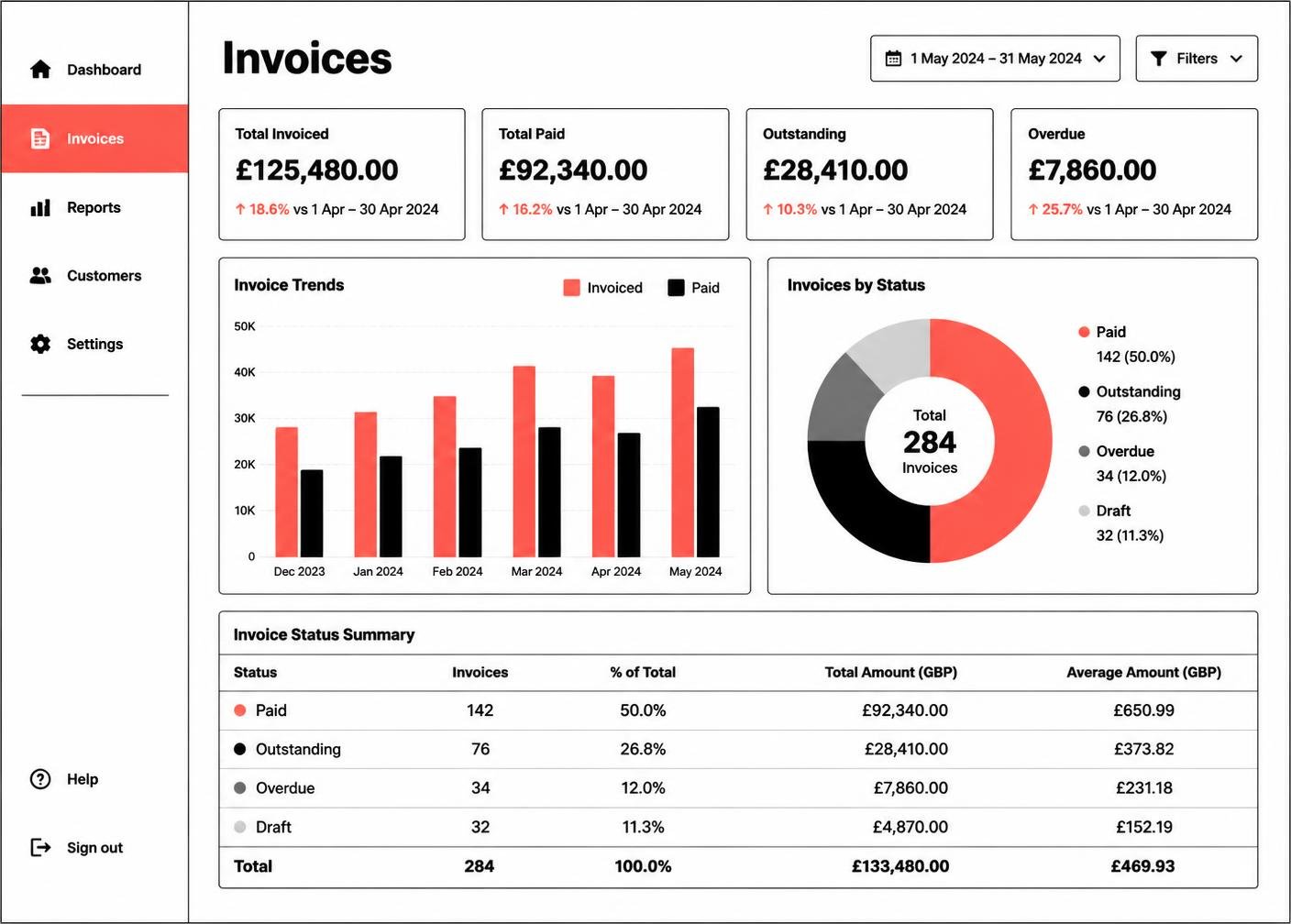
How many records sit in draft, sent, due and overdue is the fastest health check available. Large draft counts usually mean work is finished but not billed.
If most invoice value comes from one or two customers, that is a risk worth knowing about, not just a statistic.
Month to month comparisons in seasonal businesses mislead. Compare the same period year on year where you can.
These summaries describe the records you entered. They are not accounts, not a tax position and not a substitute for professional advice.
Producing an export while records are fresh is easier than assembling one under deadline pressure.
Invoicing becomes easier when the structure around it is predictable. InvoiceHarbour Cloud provides that structure: a place for customers, invoice records, service items, due dates and payment notes. It organises the information; the commercial decisions remain yours.
This article is general information about business administration. It is not accounting, tax or legal advice.
A simple structure for invoice records that stays readable a year later.
Why a boring, sequential reference format is the most useful decision you will make.
Draft, sent, due, paid, overdue: what each status should actually mean.
Compare the six InvoiceHarbour Cloud packages and choose the record capacity, workflow features and setup support that match how you invoice.